If you’ve ever tried lining up your smartphone with a telescope eyepiece, you’ll know that it can be a real struggle: shaky alignment, blurry shots, and a tiny circle of light that never seems to stay centred. Thankfully, the best smartphone telescope adapters make that problem disappear.
Today’s adapters are stronger, easier to adjust, and far more compatible with modern phones — meaning anyone can start capturing impressive night-sky images.
This guide walks you through the top smartphone telescope adapters, complete with quick recommendations, a comparison table, and tips for choosing the perfect model for your telescope and photography goals.
Note: This post contains affiliate links. If you buy through these links, I may earn a small commission at no extra cost to you. As an Amazon Associate, I earn from qualifying purchases.
Quick Verdict (If you’re short of time)
- Best Overall Adapter:
- Celestron 81037 Smartphone Adapter DX Kit — Reliable, sturdy, great alignment, includes Bluetooth remote.
- Best for Multi-Device Use:
- Gosky Universal Mobile Adapter — Works with telescopes, binoculars, spotting scopes, microscopes.
- Best Budget Pick:
- Slokey Phone Adapter Pro — Affordable, lightweight, perfect for casual astrophotography.
- Best for Precision:
Tridaptor 3-Axis Alignment Adapter — Superb fine-tuning for advanced planetary and deep-sky work.
- Best for Families & Beginners:
Gosky / Slokey — Quick setup and very forgiving alignment.
What Makes a Great Smartphone Telescope Adapter?
A high-quality adapter does three things extremely well:
1. Holds Your Phone Steady
A secure grip with padded clamps prevents vibration and stops the phone from shifting during long exposures.
2. Aligns the Camera Precisely with the Eyepiece
The biggest cause of poor photos is misalignment.
The best adapters use sliding plates or fine-tuning knobs to eliminate vignetting and produce full-frame images.
3. Fits Both Your Phone and Your Telescope
Universal compatibility means you’re not forced to upgrade gear.
Look for models that work with:
- 1.25″ eyepieces (most common)
- larger 32–62mm spotting-scope eyepieces
- multiple phone sizes, including cases
Metal construction, quick setup mechanisms, and access to your camera apps are also big bonuses.
Top Smartphone Telescope Adapters For 2026
Below are the top adapters chosen for build quality, ease of use, alignment accuracy, and customer satisfaction.
Celestron 81037 Universal Smartphone Adapter DX Kit
Best Overall Adapter
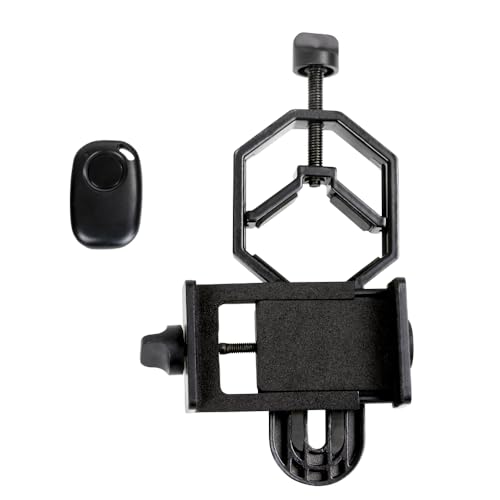
The Celestron DX Kit remains a favourite because it strikes the perfect balance between stability, ease of use, and compatibility.
The included Bluetooth shutter remote allows you to capture crisp Moon and planet shots without touching your phone.

Why It’s Great
- Strong metal frame for outdoor use
- Easy alignment thanks to precise adjustment knobs
- Compatible with most modern smartphones, even with cases
- Fits 29–45mm eyepieces including standard 1.25″ astronomy eyepieces
- Bluetooth remote reduces vibration for sharper images
Best For
Beginners, families, and anyone who wants a dependable, shake-free astrophotography setup.
Potential Drawbacks
A little bulkier than lightweight adapters — but worth it for the stability.
Gosky Universal Mobile Phone Adapter
Best for Multi-Device Use
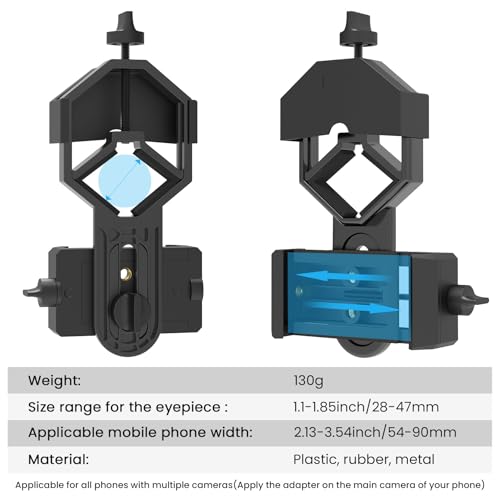
The Gosky Universal is ideal if you want an adapter you can use with telescopes, binoculars, spotting scopes, and microscopes. Its open-frame design keeps all buttons and camera apps easily accessible.
Why It’s Great
- Fits a huge range of optics
- Wide smartphone compatibility (even larger models)
- Lightweight and portable
- Open-frame design makes it excellent for app-based imaging
Best For
Users who want one adapter for all types of optics — including nature and wildlife observers.
Potential Drawbacks
Alignment requires patience with small eyepieces.
Slokey Phone Adapter Pro
Best Budget Pick
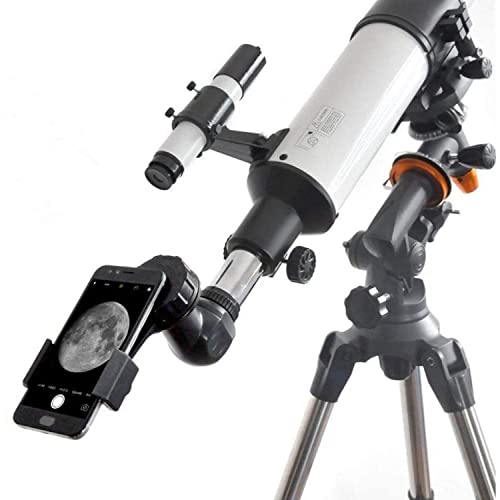
Slokey’s adapter is a surprisingly capable, low-cost option. It’s perfect for beginners or anyone wanting to try smartphone astrophotography without a big investment.
Why It’s Great
- Works with eyepieces from 2.5–4.5 cm
- Reinforced aluminium plate improves stability
- Double padded grip protects your phone
- Very quick and simple to set up
- Exceptionally portable
Best For
Beginners, families, kids, and casual backyard stargazers
Potential Drawbacks:
No fine-tuning knobs, so alignment is manual — but you get used to it quickly
Tridaptor Precision Alignment Adapter
Best for Precision & Advanced Imaging
The Tridaptor is the most advanced adapter on this list. It features true three-axis alignment, allowing you to fine-tune your camera position with engineering-level precision.
This is especially useful for: planetary imaging, lunar mosaics, stacked deep-sky photos and telescopes with long focal lengths

Why It’s Great
- Full metal body for zero flex or wobble
- Up/down, left/right, and forward/back adjustments
- Secure clamping for large iPhone/Android models
- Built for long exposures and high magnification
Best For
Intermediate–advanced users who want the most precise alignment possible.
Potential Drawbacks:
Heavier, larger, and more expensive — but unmatched in accuracy.
Comparison Table — Best Phone Telescope Adapters
| Adapter | Best For | Eyepiece Compatibility | Key Features | Price Range |
|---|---|---|---|---|
| Celestron 81037 DX Kit | Best overall | 29–45mm | Sturdy metal frame, Bluetooth remote, easy alignment | ** |
| Gosky Universal | Mixed optics (binoculars + scopes) | 32–62mm (big version) | Open-face design, lightweight, very universal | * |
| Slokey Phone Adapter Pro | Budget + beginners | 25–45mm | Reinforced grip, simple setup, portable | * |
| Tridaptor 3-Axis | Precision imaging | 22–61mm | Full XYZ fine adjustment, metal construction, rock-solid | *** |
How to Choose the Right Adapter for Your Telescope & Photography Style
Different setups benefit from different adapter types. Here’s what to look for depending on your gear and goals.
Matching Your Adapter to Your Telescope
Refractors & Small Reflectors
Choose lightweight, simple adapters like:
- Slokey
- Gosky
These work well with smaller 1.25″ eyepieces.
Dobsonians & Large Reflectors
Go for strong, precise models such as:
- Celestron DX
- Tridaptor
These help stabilise larger phones and wider eyepieces.
Spotting Scopes & Binoculars
Look for multi-use designs:
- Gosky
- Slokey
Matching Your Adapter to Your Photography Style
Quick Moon Shots with Kids
Choose something easy and forgiving:
- Slokey
- Gosky
Planets & High Magnification
Look for precision:
- Celestron DX
- Tridaptor
App-Based Imaging
You’ll want open access to the screen and buttons:
- Gosky
Final Tips for Better Smartphone Astrophotography
Even the best adapter won’t save a badly focused or unstable setup, so keep these in mind:
- Use a tripod-mounted telescope
- Let your telescope cool to ambient temperature
- Turn on manual focus or “infinity” mode if your app supports it
- Lower ISO for cleaner images
- Use a shutter remote or timer
- Take multiple shots and stack them (apps like NightCap, DeepSkyCamera, or Halide)
Conclusion: Ready to Capture Stunning Night-Sky Shots?
Smartphone astrophotography has never been easier. With the right adapter, you can take clear, impressive photos of the Moon, planets, and even bright deep-sky objects — all without professional gear.
For most people, the Celestron 81037 DX Kit is the perfect all-rounder.
If you’re looking for a budget-friendly option, go with Slokey.
For precision and long-exposure work, the Tridaptor is unbeatable.
Ready to start capturing the night sky with your phone? Smartphone Astrophotography Made Easy walks you through simple techniques, recommended apps, and gear tips to help you get stunning shots—without expensive equipment or steep learning curves.
Frequently Asked Questions
Most modern smartphone telescope adapters are designed to be universal and will fit both iPhones and Android phones. As long as your phone falls within the supported width range and the camera lens isn’t blocked by the clamp, it should work. Many adapters even support phones with cases attached.
Smartphone telescope adapters work with most telescopes that use standard eyepieces, especially common 1.25″ eyepieces found on beginner and intermediate telescopes. They also work well with binoculars and spotting scopes, provided the eyepiece diameter is within the adapter’s supported range.
With a good adapter and steady setup, you can photograph the Moon, Jupiter’s moons, Saturn’s rings, Venus’s phases, star clusters, and even bright nebulae. Results improve significantly when using manual camera apps and image stacking techniques.
A Bluetooth shutter remote isn’t essential, but it greatly improves image sharpness by eliminating vibrations caused by tapping your phone’s screen. Many adapters include one, and it’s especially useful for high magnification or long-exposure shots.
Dark or blurry images are usually caused by misalignment, poor focus, or camera settings. Make sure your phone’s camera is centred over the eyepiece, the telescope is carefully focused by eye first, and your camera app isn’t using excessive zoom or auto exposure. Using a stable mount and lower ISO settings also helps.