Taking photographs of the night sky with a smartphone can be a rewarding way to get started in astrophotography. You may already have a camera capable of capturing the Moon, bright stars and some attractive night-sky scenes.
But what if you want to photograph distant objects in greater detail? Clip-on phone lenses promise extra magnification and new photographic possibilities, but do they actually deliver?
The answer depends on the lens, your phone and what you want to photograph. Some attachments may be useful for experimentation, while others can produce disappointing results.
In this guide, we’ll look at how clip-on phone lenses work, the problems you may encounter, and the alternatives worth considering before you spend your money.
What Do Clip-On Phone Lenses Actually Do?
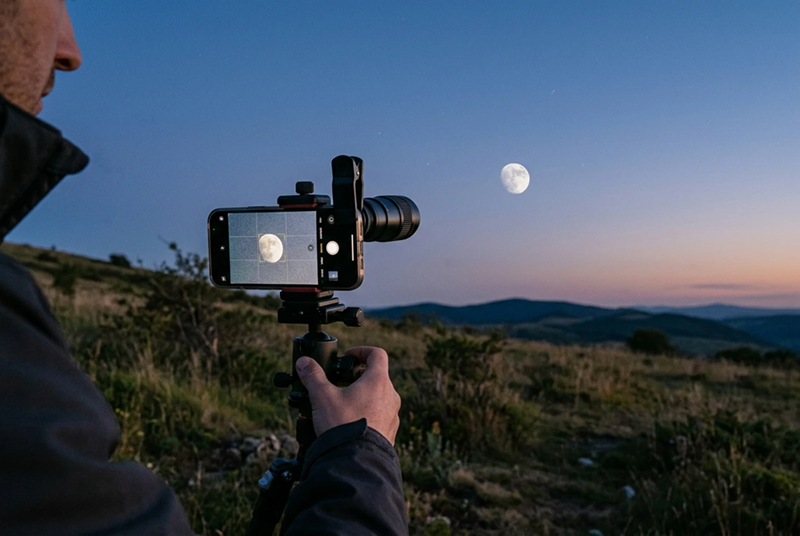
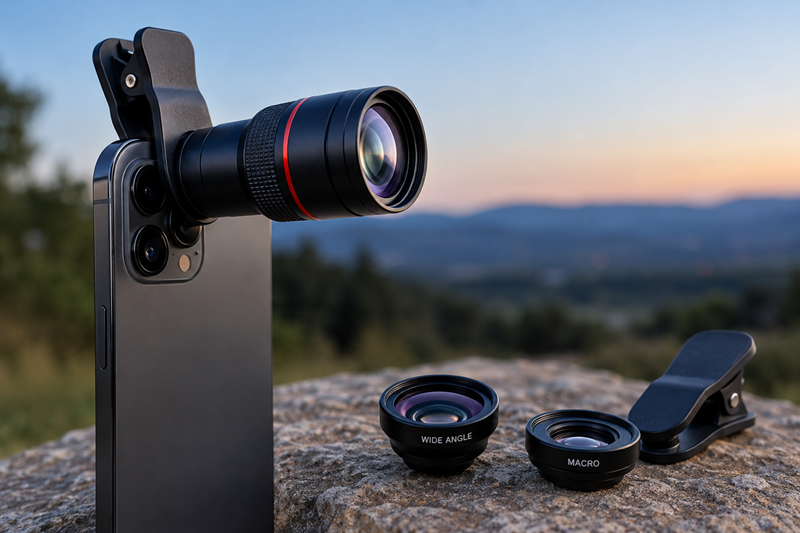
A clip-on phone lens is a small optical attachment that sits over your smartphone’s existing camera. Most use a spring-loaded clip or a mounting system to hold the lens in position.
These attachments change the way your phone photographs a subject, but different types of lens are designed for different purposes.
- Telephoto lenses are designed to make distant subjects appear larger, which can be useful when photographing the Moon.
- Wide-angle lenses capture a wider view, potentially helping you include more of the night sky in a photograph.
- Macro lenses are designed for close-up photography and have little practical use for photographing astronomical objects.
Optical Magnification vs Digital Zoom
Digital zoom enlarges a portion of an image captured by your phone. Depending on the phone and how the image is processed, this can make details look softer or less clear.
An additional optical lens changes how light reaches the camera sensor. However, optical magnification does not automatically mean more detail. The result depends on the quality of the lens, how well it aligns with your phone’s camera and how accurately you can focus.
The same applies to a phone’s built-in telephoto camera: results depend on the camera’s capabilities and the conditions in which you use it.
Before buying an extra lens, it’s worth learning what your existing phone camera can achieve. You may find that a steady support and suitable camera settings make a more noticeable difference than an additional attachment.
The Common Problems with Clip-On Phone Lenses
Clip-on phone lenses can be useful in the right circumstances, but they introduce extra optical and practical challenges. Understanding these before buying one can help you avoid disappointment.
Alignment and Compatibility
A clip-on lens needs to sit correctly over the phone’s active camera. Even a small alignment error can affect image quality, sometimes causing dark corners or uneven sharpness.
Compatibility can also be an issue. Modern smartphones often have several rear cameras, and a universal clip may not line up properly with the camera you want to use. A phone case can make the fit more difficult, too.
Before buying an attachment, check that it is suitable for your particular phone and that it can be positioned securely over the correct camera.
Soft Images and Colour Fringing
One possible disappointment is that a lens can make the Moon appear larger without revealing more surface detail.
Depending on the lens and how it is fitted, poor optical quality, inaccurate alignment or imperfect focus can contribute to a soft or blurry image. Some lenses may also produce chromatic aberration, an optical effect that creates coloured fringes around high-contrast edges, such as the Moon against a dark sky.
These effects vary between lenses. A well-designed attachment may perform better than a poorly made one, so magnification alone is not a reliable indication of image quality.
Focusing Difficulties
Getting a sharp image can be harder than expected. The phone’s autofocus may struggle with the additional optics, and some camera apps offer limited control over manual focus.
If the image looks blurry, check the attachment’s alignment, clean both the phone camera and the additional lens, and try adjusting focus if your phone allows it. Remember that poor optical quality cannot always be corrected through camera settings.
Stability Issues
Magnification makes small movements more noticeable. Even slight movement of the phone or a loosely attached lens can spoil an otherwise promising photograph.
A secure attachment and a stable tripod can help reduce camera shake. A timer or remote shutter can also help you avoid moving the phone when taking the photograph.
However, stability is only part of the solution. A tripod cannot compensate for poor optics, and a larger image is not necessarily a sharper one.
These potential limitations help explain why some clip-on lenses may produce disappointing results. They do not mean that every attachment is ineffective, but they are good reasons to check compatibility, optical quality and realistic performance before spending money.
Can Clip-On Lenses Actually Photograph the Moon?
Yes. The Moon is one of the most realistic targets for smartphone astrophotography, and a clip-on telephoto lens can help make it appear larger in your photographs.
However, there is an important distinction between making the Moon look bigger and capturing more of its surface detail. An additional lens may enlarge the image without making it any sharper. The result depends on the quality of the lens, how accurately it aligns with your phone’s camera and how well you focus.
What Can You Realistically Expect?
Depending on your phone and the lens attachment, you may be able to photograph the Moon’s circular outline, its darker lunar plains and some of the larger features on its surface.
Results can vary considerably. Some combinations of phone and lens may produce a useful image, while others may give you a larger but softer image than your phone’s built-in camera.
Don’t assume that a clip-on lens will reveal fine lunar detail simply because it advertises high magnification. The quality of the resulting photograph matters more than the magnification figure alone.
How to Get Better Moon Photographs
Before buying an additional lens, try these simple techniques with your existing phone.
1. Use a stable tripod or support
Keeping your phone steady helps reduce blur. A timer or remote shutter can also help prevent movement when you take the photograph.
2. Adjust the exposure
The Moon is much brighter than the surrounding night sky. If it appears as a featureless white disc, reduce the exposure using your phone’s camera controls, if available. This can help preserve visible surface detail.
3. Check the focus
Make sure the Moon looks as sharp as possible on your screen. If your camera app offers manual focus, experiment with it rather than assuming autofocus will always give the best result.
4. Compare different zoom settings
Try your phone’s normal camera, any built-in telephoto camera and the available zoom settings. Digital zoom can soften an image, but the result depends on the phone’s hardware and image processing. Don’t assume an external lens will automatically perform better.
5. Take several photographs
Take a number of shots and compare them at the same displayed size. This makes it easier to judge whether an attachment is genuinely improving the image rather than simply enlarging it.
Is a Clip-On Lens Worth Buying for Moon Photography?
It might be, particularly if your phone has limited zoom capabilities and you find an attachment with suitable optics and reliable compatibility.
However, if your phone already has a capable telephoto camera, a clip-on lens may offer little improvement. You may get better results simply by stabilising your phone and learning to control the exposure.
The sensible approach is to experiment with the camera you already own before spending money. If you consider an additional lens, look for credible sample photographs taken with the same lens and, ideally, a similar phone. Judge it by the quality of the results, not by its advertised magnification alone.
What Works Better for Smartphone Astrophotography?
If you’re hoping to take better photographs of the night sky with your phone, buying an additional lens isn’t necessarily the best place to start. A few simple improvements to your technique may make a bigger difference.
1. Make the Most of Your Phone’s Existing Camera
Before buying extra equipment, find out what your phone’s camera can already do. Some smartphones have built-in telephoto cameras, night modes or manual controls that give you more flexibility than you might expect.
Try photographing the Moon using the normal camera and any built-in telephoto option. Compare the results at the same displayed size rather than judging them by how large the Moon looks on your screen.
For wider views of the night sky, experiment with your phone’s main camera. The best option will depend on your phone, the subject and the available light.
If you’d like to explore smartphone night-sky photography further, our Smartphone Astrophotography Made Easy guide covers the basics, including stability, camera apps and using a telescope adapter.
2. Use a Tripod or Stable Support
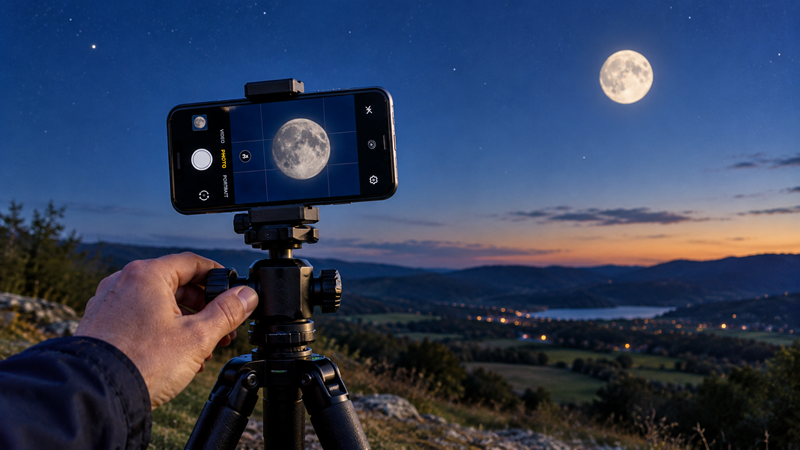
One of the simplest ways to improve your results is to keep your phone steady. A tripod with a suitable phone holder can help reduce movement and make it easier to frame your subject.
A timer or remote shutter is useful, too, because it allows you to take a photograph without touching the phone at the moment of capture.
Stability won’t fix every problem, but it is a sensible starting point before investing in additional optics.
3. Learn to Control Exposure and Focus
Automatic camera settings can struggle with night-sky subjects, particularly when a bright Moon appears against a dark background.
If your phone allows you to adjust exposure, try reducing it when photographing the Moon so that its surface doesn’t become an overexposed white disc. Check focus carefully, and experiment with manual controls if your camera app provides them.
For stars and wider night-sky scenes, results depend on more than magnification. Your phone’s sensor, exposure options, image processing and the darkness of your observing location all play a part.
4. Choose Your Target Carefully
Not every astronomical subject is equally easy to photograph with a smartphone. The results you can achieve depend on your phone’s camera, available exposure controls, image processing and observing conditions. Some targets are much more challenging than others.
- The Moon: Usually the most accessible target, especially when you can keep the phone steady and control exposure.
- Constellations and wide star fields: Worth trying with your phone’s existing camera, particularly in a dark location.
- Planets: More challenging than the Moon. They may appear as tiny bright points, and capturing meaningful surface detail generally requires more magnification and careful technique than a basic clip-on lens is likely to provide.
- Nebulae and galaxies: Generally much harder to photograph well with a phone alone because these objects are faint. Results depend on the phone, exposure, image processing and, for some targets, tracking equipment.
Your expectations matter. A phone can be a rewarding way to explore night-sky photography, but it won’t necessarily produce the same results as dedicated astrophotography equipment.
5. Consider a Telescope for Greater Detail
If your main goal is to photograph the Moon or planets at greater magnification, a telescope may be a more useful option than a generic clip-on lens. You can also use a suitable smartphone adapter to hold your phone over a telescope’s eyepiece.
This involves additional equipment and has its own limitations, so it’s worth researching before buying. Our guide to the best smartphone telescope adapters explains how to attach your phone to a telescope’s eyepiece.
The main takeaway: start with your existing camera, a stable support and a little experimentation. Once you understand what is limiting your photographs, you can make a more informed decision about whether extra equipment is worth buying.
Should You Buy a Clip-On Phone Lens for Astrophotography?
A clip-on phone lens may be worth considering if you enjoy experimenting with smartphone photography and understand its limitations. However, it’s not an essential purchase for beginners, and advertised magnification figures alone are no guarantee of better photographs.
Before spending money, think about what you want to photograph and what your current phone can already achieve.
A Clip-On Lens May Be Worth Considering If…
- You want to experiment with making the Moon appear larger in photographs.
- Your phone has limited optical zoom, and you have found an attachment that is genuinely compatible with it.
- You’re happy to experiment with positioning, focus and camera settings to see whether the results improve.
- You can find credible examples taken with the exact lens and a similar phone, rather than relying only on promotional photographs.
You May Be Better Off Without One If…
- You expect a cheap attachment to reveal fine lunar or planetary detail simply by increasing magnification.
- Your phone already has a capable telephoto camera.
- The product has unclear compatibility information or little convincing evidence of its optical performance.
- You’re still learning the basics of focusing, exposure and keeping your phone steady.
In these circumstances, practising with your existing camera and a stable support may be the better first step.
What Should You Check Before Buying?
If you decide to try a clip-on lens, check three things before placing an order:
- Compatibility: Make sure it fits your phone and can align correctly with the camera you intend to use.
- Optical performance: Look for credible sample photographs and independent assessments where available. Be cautious about relying on magnification claims alone.
- Realistic expectations: Check what the lens is designed to help you photograph. A larger-looking Moon is not necessarily a more detailed Moon.
Also check the returns policy in case the lens doesn’t work well with your phone.
Our Verdict
Clip-on phone lenses aren’t automatically a waste of money, but neither are they a shortcut to impressive astrophotography. Their usefulness depends on the quality of the optics, compatibility with your phone and the subject you’re photographing.
For most beginners, the sensible approach is to start with the camera they already own, learn to control exposure and focus, and use a stable support. If they still want to experiment with an additional lens, they can then make a more informed choice.
The bottom line: don’t buy a clip-on lens just because it promises high magnification. Buy one only if there’s good reason to believe it will improve the photographs you actually want to take.
Frequently Asked Questions
They can be useful in some circumstances, particularly for experimenting with Moon photography, but results vary considerably. Optical quality, compatibility and alignment all affect performance. A larger image doesn't necessarily contain more detail, so check realistic sample photographs before buying.
Yes. Many smartphones can photograph the Moon without an additional lens, although the amount of detail you capture depends on the camera, its zoom capabilities and your technique. Keeping the phone steady, reducing exposure when necessary and focusing carefully are good starting points.
They may make a planet appear larger, but that doesn't mean you'll capture more detail. Planets are challenging targets because they appear very small in the sky, and a basic clip-on lens is unlikely to provide the magnification and image quality needed for detailed planetary photographs.
Not necessarily. A built-in optical telephoto camera may produce better results than an inexpensive attachment, but performance depends on the phone and the additional lens. Digital zoom can soften an image, too. The best approach is to compare photographs taken with your available camera options rather than assume one method will always be better.
Start with what you already have. Use a stable tripod or phone support, learn to adjust exposure and focus, and practise on the Moon or brighter night-sky subjects. These steps can help you understand your phone's capabilities before deciding whether additional equipment would be worthwhile.